
Open Equipment → Arcanas, equip the card whose task you are attempting, and read its Works of Mercy. Complete a task to earn that card’s Blessing, then spend the Blessing on a Gift on the same screen. Earning a Blessing and activating a Gift are separate steps.
From a task to an active Gift
- Open Equipment and select Arcanas. Choose a card you already own; its spell and Works of Mercy appear together.
- Equip the target card before making your attempt. This keeps the required spell available and its relevant progress visible. Read the task’s action, target and time or count condition.
- Carry out the task and check its counter. A Work of Mercy completed notification confirms completion; a browser checklist tick cannot confirm it.
- Return to the card’s spell panel. Select an available Gift and assign the earned Blessing. An unspent Blessing does not activate an upgrade.
- Keep that Arcana equipped to use its upgraded spell. A Blessing earned for one card is not a general currency to spend on another.
This page concentrates on task conditions and the upgrade workflow. It does not present a purported complete task total: published lists disagree about whether The Cursed’s hidden entry should count.
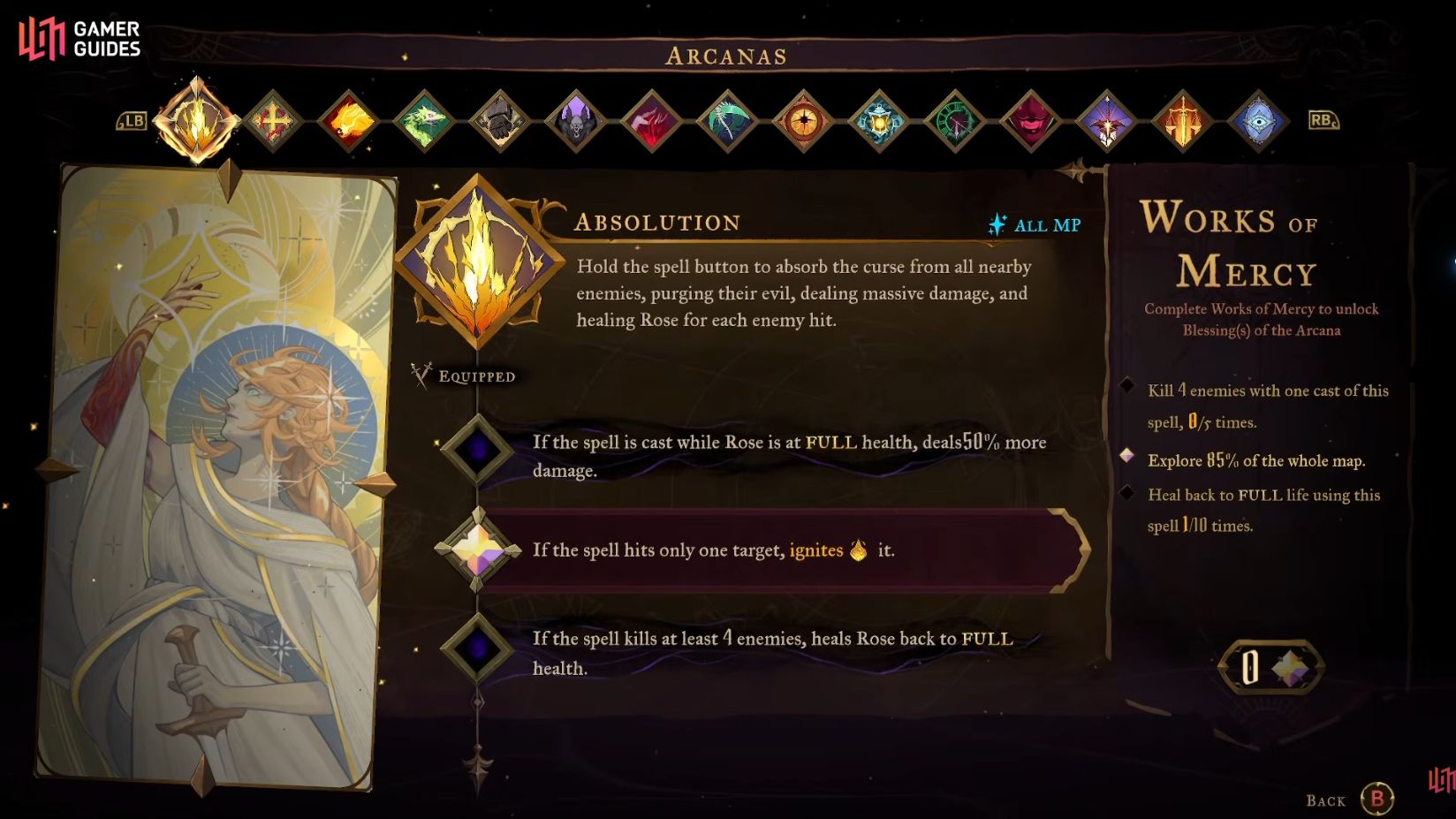
Read the spell, Gifts and individual Works of Mercy on the same card panel. This Absolution panel is a menu example; its conditions do not apply to other cards.
Gameplay capture: Gamer Guides · 8:23 in the original video ↗ · Game © KONAMI / Evil Empire. Not our own recorded playthrough.The Works of Mercy chapter explains the task-to-Blessing-to-Gift workflow. Check the card menu and your own counter as you follow it.
IGN · 11 Things It Doesn’t Tell You · Player loads when you choose Play.Watch on YouTube ↗Task checks that commonly cause confusion
| Card / task | What to do | What does not satisfy it |
|---|---|---|
| The Cursed — Cursed Flame hits | Land 20 hits with the equipped spell. Check the counter after a connected fireball. | The condition is hits, not 20 kills. |
| The Fallen — one cross, five kills | Send one Holy Cross through a group of weak enemies; its outward and returning path belong to that throw. | Five separate casts with one kill each are not one cross. |
| The Fallen — whip attack kills | Use the Arcane Whip follow-up attack to finish enemies. With default PlayStation controls, grapple with R2 and time Square just before reaching the enemy. Watch for the brief slowdown. | Grappling toward an enemy without the timed damaging follow-up is not that attack. |
| The Builder — Smash kills | Unlock Smash, then finish 15 enemies with the downward movement attack. | The Fist of Talos spell and a Smash are separate actions. |
| The Artist — Main Hall secret zones | Check hidden passages and mechanisms against the in-game task. Use the Main Hall return-route guide. | Opening ordinary rooms or ticking every item on our selected-route checklist does not establish full completion. |
| The Temptress — Hall of Mirrors rooms | Revisit unrevealed branches with the card equipped and compare your map with the maze landmarks. | Defeating Succubus does not itself show that all rooms were explored. |
| The Sage — save rooms | Revisit the Mirrors of Life required by the task and check its counter on The Sage. | Finding a mirror on an external map does not mean you used it in this save. |
| The Self — exploration and healing | Read the Absolution panel: it lists an 85% map-exploration condition and a separate full-healing condition. Use the counter shown in your game. | Obtaining The Self is not the same as completing its Works of Mercy. |
The counts above describe individual task conditions, not the number of tasks or collectibles in the game. The full task lists are linked in Sources; this is a focused solution table.
When a task does not count
- Read the exact verb. Hit, kill, parry, explore and heal require different outcomes. For a kill condition, ensure the specified action delivers the finishing damage.
- Check the active card and action. A named movement ability can be different from that card’s spell. Smash is not the Fist of Talos spell; a timed whip attack is not an ordinary grapple.
- Keep one-attempt conditions together. “With the same cross” and “within” conditions must be met by the same throw or time window.
- Compare the counter before and after one controlled attempt. If it moves, repeat that method. If it does not, change the action or target before spending more time grinding.
- Check Gifts separately. If the task completed but the spell seems unchanged, return to Arcanas and verify that its Blessing was assigned.
Before leaving the Arcanas screen
Saved in this browser. These checks do not read your game save.
Some tasks lead into longer routes. See Smash and yellow blocks, the Double Jump unlock and the four-virtue ending route when progression is the blocker.
Sources & verification
- IGN: Works of Mercy chapter ↗ — primary gameplay explanation of tasks, Blessings and Gifts
- KeenGamer: Arcana upgrade guide ↗ — menu workflow and cross-check of selected task wording
- MapMaster: task instructions ↗ — timed whip follow-up and one-cross conditions
- Fextralife: Works of Mercy ↗ — cross-check of task conditions
- Gamer Guides: Absolution panel ↗ — visible Works of Mercy and Gift menu
Checked 19 October 2026 against the credited gameplay and reference guides. Screenshots are credited video captures, not our own playthrough. Default button labels may differ if controls are remapped.